Frequently I come across a blog post or an article that lists great apps. Judge for yourself, as I am not a critic, I am just providing the links:

  1. What's On My iPad - teacher features
  2. 11 iPad Apps to Show Off
  3. iPad Apps - Top Apps
  4. PC Magazine (Aug 11) 100 Best
  5. iEar - I Education Apps Review - iPad Apps Reviewed
  6. Links and stories about apps
  7. App News - Android and iOS
  8. iPad recommended education apps
  9. Tony Vincent's recommendations
  10. Tech Radar - Best apps 2012
  11. 2012 - Larry Ferlazzo's list of places to find apps for education
  12. Tom Barrett's iPad page of links and suggested apps and how to use them in the classroom
  13. Top 10 Apps for Digital Storytelling - Paula Nagle
  14. 29 Days of Andriod Apps by Richard Byrne
  15. TechChef4u Recommends - Lisa Johnson
  16. 21st Century Learning - At Martin J. Gottlieb Day School


As you can imagine, this list will be already out of date as soon as I push the publish button. I will try to post more sites as I see them in various places online. In the meantime, enjoy!


Links to this post
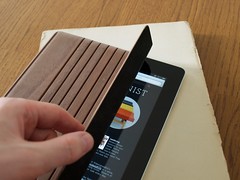
Walnut iPad cover by MiniotWalnut iPad cover by Miniot (Photo credit: Stewf)I have a few new "toys" to share. First of all our school purchased iPads for a few projects. After working with them and students I must conclude that the Apple designed magnetic cover is not great for middle school students.  There are so many better choices for students to hold the iPad, prop it up and easily type on the screen. One of my favorites is PropUp iPad case. The cost is $30, but will fit an iPad that has a silicone cover as well. Yesterday another tacher showed me the $5 stand she bought at the store Five Below. It is plastic and the angle can be adjusted easily.
I found the silicone covers for under $10 at discount stores like TJMaxx, Marshalls, Target, Wall-Mart and Ross. There are some at Five Below, but the quality is questionable on those. Cheap screen savers can be found at Five Below as well. There are other bargains to be found on ebay if you like looking there for items.
Some students will enjoy using a stylus and these too can be found at discount prices. Once again Five Below has one for $5, but it is thicker than a pencil. The best bargain can be found at Amazon.com: 3 Pack of Universal Touch Screen Stylus Pen (Red + Black + Silver): Cell Phones & Accessories for $2.00. They are fine even if you get them and your kids do not like them, not much is lost for $2 for three stylus pens is a good deal. If you want to spend more you can purchase ONE from Apple at $15. Happy shopping.

Enhanced by Zemanta


Links to this post
iPad miniiPad mini (Photo credit: patrick-allen)This is a blog site that has some recommendations for apps both free and paid. Most are recommended for the iPad, idevices and are for grades 2-6.
Enhanced by Zemanta


Links to this post
PETE&C is the Pennsylvania Educational Technology Exposition & Conference. It is a long name for a smaller, but excellent educational technology conference. Held in Hershey for the past nine years, it attracts around 2,200 educators, principal, IT Directors as well as others from all over the US.

On Sunday DiscoveryEducation sponsors a pre-conference day of discovery with sessions unlike the conference schedule. Most of the sessions are right on current or emerging technologies with ideas you can take back to your classroom to use right away.

Steve Dembo and Porter Palmer from DiscoveryEducation started off the day with a few demos and challenges. Dembo challenged the audience to "blow up old models of a classroom". Be creative with everything from the seating to the location of materials around the room. He also showed how is young son is using some augmented reality games with manipulatives:

  1. Life of George
  2. Cublets
  3. Sifteo cube
These are great for younger students who want to learn about robotics. There are so many different ways kids can play with robots without realizing that they are learning, creating and perhaps finding their future.


Links to this post

iPad is a Wi-Fi 64 GB version (another one beh...Image via Wikipedia
I run a club on Mondays called "iTouch, iPad, iPhone". There are about 30 middle school boys and girls in grades 6-8. Each week we share what is new and their favorite apps. This week I am going to share with them the following FREE apps:

  1. Blockwick - an Unblock Me type of thinking puzzle game.
  2. Tiny Tower - Lifestyle type of game for creating your own tower of shops, people and businesses.
  3. Jet Pack Joyride - Arcade type of game.
  4. Hero Academy - just what is says - create and train new superHeros.

Enhanced by Zemanta


Links to this post
Here are some resources for learning about QR Codes including a great introduction by the folks at Common Craft. Of course you have seen the little square black and white codes in magazines, newspapers and sometimes at retail establishments. You need a smartphone with a QR reader app in order to decipher the information in the code.

My school site
To create a QR code there are several choices here. This is a nice site for using color in your codes. I created this color code for our school. Try it by scanning with your smart phone. I used the site above to create this in our purple school color. On the iPhone I like to use QRReader or Scan. I plan on putting this on the door to our building, so people can scan it when school is closed. This might be helpful if an event was cancelled or people arrive early or at the wrong date. They can get directly to our web page and find the information they need.

In addition to the square QR codes, Microsoft has, as usual, come up with their own style of code called a tag. It is color and can embed images or designs into the tag. The second image is the same site as described in a Microsoft tag.


My school site - tagged
Read about the difference between bar codes, QR codes and Microsoft tag codes here.

Follow current trends in QR Codes in education on this Scoop.it page. Or for more reading, you can explore my Diigo QR code links. Here are more resources on QR codes from other Diigo users.

This should be enough for you to get started.
Enhanced by Zemanta


Links to this post
I came across these great fun sites for sharing Halloween. The first is a timeline of Halloween history!
  1. Halloween Timeline
  2. Larry Ferlazzo's sites for learning about Halloween
  3. Carve a pumpkin 1
  4. Cat bowling
  5. Carve a pumpkin 2


Links to this post
Vintage Fashion Mail Order Catalog, 1934Image by danagraves via FlickrIf you are tired of telemarketers calling your home, you can register at the national Do Not Call website. It is a simple process where you fill out the form with phone numbers that you want on the Do Not Call list and they will send a verification email. Click on the email link and you are on the list!

Additionally, if you are tired of getting too many catalogs, visit this site, Catalog Choice to register for do not send. I did this 3 years ago and have dramatically reduced the number of catalogs I receive in the mail. With the holiday season gearing up, you may want to get on this right away so your mailbox is not stuffed with catalogs you do not want. Plus it is good for the environment.
Enhanced by Zemanta


Links to this post
Image representing Google Docs as depicted in ...Image via CrunchBaseIf your school is using Google Apps for Education then you already know of the excellent resources available. I just want to point out one of the more recent additions, using Weekly Reader. Google has joined with Weekly Reader to prepare materials for teaching reading with google docs. There are many links on the page to offer suggestions for reading, writing and using Google within your curriculum to help students.
Enhanced by Zemanta


Links to this post

Most people are very set for the first month of school. Review of material, setting the climate of the class and reminder of your rules. Here is a site that offers handouts, lesson ideas and more for most subjects and includes K-12. I thought it would be just a few black line masters, but upon closer review I found that even after 3 clicks deep, the site revealed pages of links to sites for additional information. If you teach more than one subject, you could get lost in this site for days!
Enjoy....Free Teacher Handouts


Links to this post